
Breadcrumbs
Quick Guide: Responding to opportunities on GETS
You will need to use GETS to submit an Expression of Interest (EOI) for Round One of the Community-led Commissioning pathway of the Social Investment Fund.
1. Getting started with GETS
Government agencies use GETS to share new opportunities and buy services from different organisations. You can view the opportunities the Social Investment Agency (SIA) posts on GETS without signing up. However, to see the full details and get email alerts, you’ll need to register as a supplier.
Signing up is free. Start by visiting the GETS homepage(external link).
What you need to sign up to GETS
To create your GETS account, you’ll need:
- Your organisation or trading name (If you’re part of a collective, you can use the name of someone representing your group. You can change this later, and the person listed does not have to be the future lead contract holder.)
- Your business address
- Your name, email address, and phone number
- A RealMe login
What you can do once you’re signed up
After you register, you’ll be able to:
- See opportunities posted by government agencies
- Receive email alerts when SIA posts opportunities that might suit your organisation
- Apply for opportunities online
2. What is RealMe?
RealMe is a government authentication service. You can use RealMe to log into many New Zealand government sites and services with just one username and password to remember.
With a RealMe account, you can:
- Log in to many government websites using one username and password
- Keep your personal details safe
- Save time by not needing to remember lots of different passwords
Data sovereignty considerations
- Only the minimum amount of data required for logging in securely is captured
- No personal identity attributes are shared unless the user separately opts into RealMe’s verified identity service, which is not required to create an account on GETS
- RealMe login information, transaction history and consents are stored outside of New Zealand in the United States of America and Australia.
- When you use RealMe, your visit and transaction information will be recorded, including your IP address and domain name. This information is recorded for security reasons.
RealMe is a service managed by the Department of Internal Affairs. RealMe is designed to make it easier for people to access and use online services. It adheres to New Zealand Government security, identity and privacy legislation.
You will need a RealMe login to create an account and subscribe to opportunities on GETS.
You do not need a verified RealMe identity when creating an account or subscribing to opportunities on GETS.
Visit realme.govt.nz(external link) to learn more and to access support for your RealMe login.
For more information, see RealMe Services - dia.govt.nz(external link) and RealMe Privacy Statement – RealMe(external link)
How to set up a RealMe account
To create your RealMe account, go to the RealMe login page(external link).
You will be guided to create a username and password. The steps are simple, and the website walks you through each part.
Please note: You are not required to have a verified RealMe account to submit proposals – the login is all you need.
Need Help?
If you have any trouble creating your RealMe account, call the RealMe Helpdesk:
0800 664 774
3. Navigating GETS
Once you have registered on GETS, the steps below will help you find the opportunity you want to respond to.
Setting up your alerts (recommended):
Once your GETS account is created, we suggest turning on your notifications.
You can do this from the ‘Manage Account’ page, scrolling to the bottom, and selecting your preferred:
- United Nations Standard Products and Services Code (the types of services or work you’re interested in)
- Regions you want to receive updates about
This helps make sure you get email notifications when new opportunities are posted that are relevant to your organisation.

Finding opportunities on GETS
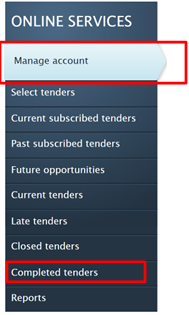
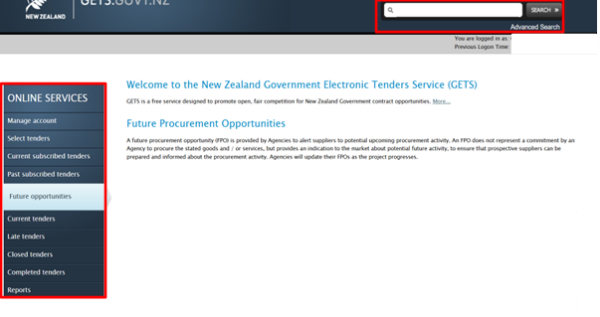
On the lefthand side of the GETS webpage, you’ll see a panel. Under “ONLINE SERVICES”, you can now access:
- Current Tenders — opportunities that are open right now
- Future Opportunities — opportunities that are coming soon
- Subscribed Notices — updates from opportunities you choose to follow
- Closed Tenders — past opportunities (helpful for learning what has been funded before)
Using the Search Bar
You can also use the search bar in the top right corner of the page. Try searching by:
- Key words
- The name of a government agency
- A reference number
This can help you quickly find the Social Investment Agency opportunity you want to respond to.
4. Responding to an opportunity
When you find an opportunity you want to respond to, you can click into the listing and:
- Subscribe to the notice (bottom of the page) to get full access to documents and updates.
- Download all tender documents: request details, checklists, terms, and attachments.
- Plan your response, make sure you have all your information and references, and refer to the guidance documents.
Check the example and checklist in the EOI documents for ideas on what the agency requires in responses.
5. Creating and managing your EOI response
Here are some helpful steps to guide you as you prepare your Expression of Interest (EOI):
- Read all the documents carefully. Take your time to look through everything provided so you understand what is needed.
- Use the messaging function to ask questions. If anything is unclear, you can message us through GETS to ask for help or check requirements.
- Review and update your response before the closing time. GETS lets you make edits right up until the deadline.
- If you are working with other organisations, check your answers together. Make sure everyone in your group or collective has seen the final version before the closing time on GETS.
- Submit your EOI before the deadline. Unfortunately, we cannot accept late submissions, even if they are only a few minutes past the closing time.
- Save your confirmation email. After you submit, GETS will send a confirmation message. Keep this for your records.
Please make sure you answer all questions in the response form and look at how different questions are valued in the evaluation criteria. If you miss a question, that may mean that the assessors are unable to progress your submission.
The agency will also decide how important each part of your answer is. They do this using “weighted scores”. For example, they might say that price is worth 30% of the total score, and your experience is worth 40%. Each bid will get a total score out of 100%. These questions will match up with what the agency said was important in the first part of the EOI document. If you’re assuming anything (like “SIA will provide all legal support”), make sure to say that clearly in your answer.
6. Checklist for submitting
Make sure you do the following when submitting on GETS:
✔ Subscribe to the EOI notice.
✔ Download and read all documents.
✔ Fill out the response form completely.
✔ Check deadlines and submit on time.
✔ Attach all required files. We ask that you only upload the documents we’ve requested, as assessors can’t review any additional materials such as pamphlets or reports.
✔ Double-check that you have included the correct contact details, that phone numbers and email addresses are correct.
Common mistakes to avoid:
✖ Leaving questions blank.
✖ Missing the deadline.
✖ Submitting additional documents not asked for in the questions
✖ Not reading the upfront documents first
7. Next steps
Once you have submitted your response, keep an eye on your email for updates from the agency.